
🐳 Whale Radar Recipe — Under the Hood

Two months ago, we announced DSV Mainnet: 3,000 snapshotters, six validators, and more than half a million finalized batches. Last week, we opened the consumption layer. Minutes later, the first Whale Radar alert landed:
🐳 Whale alert: WBTC → USDC  $245,000

Pool: 0x99ac8cA7087fA4A2A1FB6357269965A2014ABc17
Epoch: 24785719
✅ Verified on-chain
   cid: bafkrei...
   protocolState: 0xa1100CB00Acd3cA83a7C8F4DAA42701D1Eaf4A6c
   dataMarket: 0x4198Bf81B55EE4Af6f9Ddc176F8021960813f641
That alert came from Whale Radar, a ready-to-run recipe in the powerloom-bds-univ3 skill. It watches Uniswap V3 trades, filters for large swaps, resolves pool metadata, deduplicates alerts, and ships each notification with DSV-backed provenance.
If you need verified DEX alerts, whale monitoring, pool-volume triggers, or agent-readable DeFi data without running your own indexer, this recipe is the shortest path from BDS data to production notifications.
This post explains how Whale Radar works, what each alert includes, and how to run it yourself.
Every Whale Radar Alert Includes
- Trade direction and estimated USD value
- Pool address with resolved token metadata (symbols, decimals)
- Epoch and transaction/block context
- DSV verification block: CID, epoch ID, protocolState, dataMarket
Before You Start
You need a free BDS API key. Two ways to get one:
-
Browser signup (no install): Go to bds-metering.powerloom.io/metering — enter email + agent name, complete Turnstile, copy your
sk_live_...key. 30 seconds, no wallet, no CLI. -
CLI signup: Run
bds-agent signup(requirespip install bds-agentfirst). Same browser verification flow, key saved to~/.config/bds-agent/profiles/.
Both give you 2 free credits (1 credit = 7,200 epochs = 1 full day of continuous polling on ETH mainnet).
Full quickstart docs: docs.powerloom.io/agents-and-bds/quickstart
Our previous post walks through the browser signup flow with screenshots: Powerloom's Agentic Consumption Layer Is Now Open
Terms
In OpenClaw terms, a skill is an installable package of tools and scripts. A recipe is a ready-to-run workflow inside that skill. Whale Radar is a recipe inside the powerloom-bds-univ3 skill.
Run It Now: One-Shot Prompt in OpenClaw
Got your sk_live_... key from browser signup? Open OpenClaw and paste the one-shot prompt:
Copy the full prompt from GitHub
This is a complete, copy-paste prompt that tells the agent exactly what to do. It will:
- Install
powerloom-bds-univ3from ClawHub and runnpm install - Ask for your
sk_live_...API key (gathered in chat before proceeding) - Ask if you want Telegram alerts — if yes, it collects your bot token and chat ID; if no, alerts go to stdout
- Set
POWERLOOM_API_KEYin the skill environment - Run a pre-flight credit check via
node scripts/ensure-credits.mjs - Create a 15-second cron running
node scripts/whale-cron.mjswith all required env vars
Whale alerts start flowing within seconds. Every alert includes the on-chain verification block.
When your 2 free credits run out, top up with POWER on Powerloom mainnet (chain 7869) or USDC on Ethereum or Polygon. See the wallet-funded variant for autonomous on-chain pay-signup.
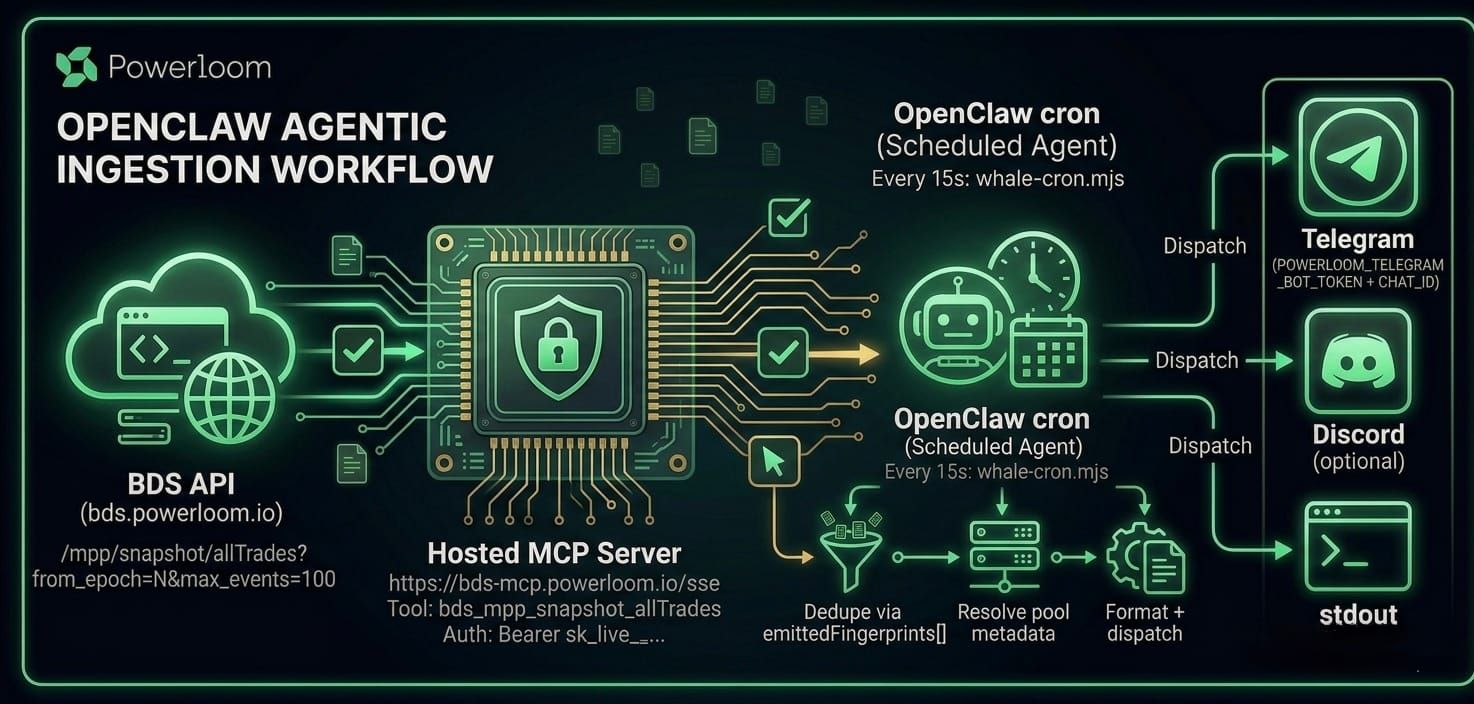
Data Flow
BDS API (bds.powerloom.io)
  /mpp/snapshot/allTrades?from_epoch=N&max_events=100
           │
           ▼
Hosted MCP Server (bds-mcp.powerloom.io/sse)
  Tool: bds_mpp_snapshot_allTrades
  Auth: Bearer sk_live_...
           │
           ▼
OpenClaw cron (every 15s)
  node scripts/whale-cron.mjs
    • Epoch cursor from state file
    • Dedupe via fingerprints
    • Resolve pool metadata
    • Format and dispatch
           │
           ▼
Output
  Telegram / Discord / stdout
The Hosted MCP Server
| Property | Value |
|---|---|
| Endpoint | https://bds-mcp.powerloom.io/sse |
| Transport | MCP SSE |
| Auth | Authorization: Bearer sk_live_... |
| Health | GET /health |
Catalog tools map one-to-one with /mpp/... routes. Two fixed tools handle cross-cutting concerns:
| Tool | Purpose |
|---|---|
verify_data_provenance |
Check CID against ProtocolState.maxSnapshotsCid |
get_credit_balance |
Return current balance and rate limits |
Zero balance returns 402 before any tool executes.
The API: /mpp/snapshot/allTrades
The cron calls one MCP tool:
const result = await callTool("bds_mpp_snapshot_allTrades", {
  from_epoch: lastEpoch,
  max_events: 100
});
Equivalent curl:
curl -H "Authorization: Bearer sk_live_..." \
  "https://bds.powerloom.io/api/mpp/snapshot/allTrades?from_epoch=25121752&max_events=100"
Parameters: from_epoch (exclusive, omit for latest), max_events (default 50, max 100).
Response:
{
  "epoch": { "begin": 25121752, "end": 25121760 },
  "data": {
    "trades": [
      {
        "poolAddress": "0x88e6A0c2dDD26FEEb64F039a2c41296FcB3f5640",
        "data": {
          "sender": "0x...",
          "calculated_token0_amount": -421.5,
          "calculated_token1_amount": 1312000.0,
          "token0_price": 3112.45
        },
        "log": { "transactionHash": "0xa1b2...", "blockNumber": 25121755 }
      }
    ]
  },
  "verification": {
    "cid": "bafkrei...",
    "epochId": 25121760,
    "projectId": "allTradesSnapshot:0x4198Bf81B55EE4Af6f9Ddc176F8021960813f641:mainnet-BDS_MAINNET_UNISWAPV3-ETH",
    "protocolState": "0xa1100CB00Acd3cA83a7C8F4DAA42701D1Eaf4A6c",
    "dataMarket": "0x4198Bf81B55EE4Af6f9Ddc176F8021960813f641"
  }
}
The verification block comes from DSV consensus.
How USD Value is Computed
Whale Radar estimates USD value from the trade amounts and token price fields in the snapshot payload:
calculated_token0_amountandcalculated_token1_amountgive the swap volumestoken0_pricegives the reference price at snapshot time
For display, the recipe resolves token symbols and decimals through the pool metadata tool and caches the result locally in .powerloom/pool-metadata-cache.json.
Epoch Cursor
The skill tracks lastStreamEpoch in .powerloom/whale-cron-state.json:
// lib/state.mjs
export function loadState(file) {
  if (!existsSync(file)) {
    return { lastStreamEpoch: null, emittedFingerprints: [] };
  }
  return JSON.parse(readFileSync(file, "utf8"));
}
Each cron tick fetches from_epoch = lastStreamEpoch + 1 (since from_epoch is exclusive), processes new trades, then writes back epoch.end as the new cursor. If OpenClaw restarts, the next run resumes exactly where it left off.
State lives outside the skill directory (WHALE_CRON_STATE_FILE=$OPENCLAW_WORKSPACE_DIR/.powerloom/...) so it survives reinstall.
Deduplication
Trades can appear at epoch boundaries. The script fingerprints each one:
export function fingerprintTrade(t) {
  const tx = t.log?.transactionHash || t.transactionHash || "";
  const bn = t.log?.blockNumber ?? t.blockNumber ?? "";
  return `${tx}:${bn}`;
}
Stored in emittedFingerprints[] with LRU-500 bound. Previously emitted trades are skipped.
Verification
Every alert includes the verification block:
✅ Verified on-chain
   cid: bafkrei...
   epoch: 25121760
   protocolState: 0xa1100CB00Acd3cA83a7C8F4DAA42701D1Eaf4A6c
   dataMarket: 0x4198Bf81B55EE4Af6f9Ddc176F8021960813f641
Verify independently via cast call on the Powerloom anchor chain:
cast call 0xa1100CB00Acd3cA83a7C8F4DAA42701D1Eaf4A6c \
  "maxSnapshotsCid(address,string,uint256)(string,uint8)" \
  0x4198Bf81B55EE4Af6f9Ddc176F8021960813f641 \
  "allTradesSnapshot:0x4198Bf81B55EE4Af6f9Ddc176F8021960813f641:mainnet-BDS_MAINNET_UNISWAPV3-ETH" \
  25121760 \
  --rpc-url https://rpc-v2.powerloom.network
Or via MCP tool verify_data_provenance with the same fields.
Alternative: bds-agent CLI (Headless, One Extra Install Step)
The OpenClaw path above gets you running with zero installs. If you prefer a terminal-first workflow, the bds-agent CLI gives you the same capabilities but requires pip install bds-agent (or uv tool install bds-agent) first.
pip install bds-agent
# or
uv tool install bds-agent
After installing, sign up for a free key:
bds-agent signup
Browser verification, key saved to ~/.config/bds-agent/profiles/<profile>.json.
Pre-packaged recipe
The CLI ships example recipes in examples/. For DEX trade alerts:
bds-agent config init
bds-agent run examples/dex-alerts.yaml
This uses the same /mpp/stream/allTrades endpoint via a streaming source with min_usd and volume_spike rules. See examples/dex-alerts.yaml and examples/dex-alerts-slack.yaml in the bds-agent-py repo for the full YAML.
Natural language query
bds-agent llm setup anthropic
bds-agent query "trade volume of pool 0xc7bBeC68d12a0d1830360F8Ec58fA599bA1b0e9b in last hour" --execute
MCP stdio
For IDEs that spawn child processes:
bds-agent mcp
Stdio transport for Cursor, Claude Desktop, Claude Code. The hosted server at bds-mcp.powerloom.io/sse uses HTTP SSE instead.
Credits
1 credit = 7200 epochs.
How consumption works
Every /mpp/... request deducts credits. The MCP server forwards your Bearer token to the resolver, which applies the deduction. Zero balance returns 402.
At a 15-second polling interval, the free 2-credit signup is intended for experimentation. For long-running production monitoring, top up with a paid plan.
Check balance:
curl -H "Authorization: Bearer sk_live_..." \
  https://bds-metering.powerloom.io/credits/balance

# or
bds-agent credits balance
Plans
Live from GET /credits/plans:
| Plan | Cost | Credits | Chain | Payment |
|---|---|---|---|---|
| Free | Email verification | 2 | — | Browser flow |
| launch_10_pl_power_cgt | 50 POWER | 10 + 2 bonus | Powerloom (7869) | Native transfer |
| launch_10_eth_power | 50 POWER | 10 + 2 bonus | Ethereum (1) | ERC-20 |
| launch_10_eth_usdc | 5 USDC | 10 + 2 bonus | Ethereum (1) | ERC-20 |
| launch_10_pol_usdc | 5 USDC | 10 + 2 bonus | Polygon (137) | ERC-20 |
List current plans:
curl -sS https://bds-metering.powerloom.io/credits/plans | jq
bds-agent credits plans
Pay-signup
bds-agent credits setup-evm
bds-agent signup-pay --plan-id launch_10_pl_power_cgt --chain-id 7869 --token-symbol POWER
Top-up
bds-agent credits topup
What's Next
More data markets are coming. The same skill patterns work across chains and protocols. When a new market goes live, you add the endpoint to your catalog, point your MCP client at the new endpoint, and your existing recipes just work.
Token-Flow gets its own deep-dive next. Then Pulse. Then DeFi Analyst.
Try the free key, run Whale Radar, and bring your first verified DeFi alert into Telegram or Discord.
Resources
- ClawHub: powerloom-bds-univ3
- Free-key prompt: 09-openclaw-one-shot-free-key.md
- Wallet-funded prompt: 08-openclaw-one-shot.md
- CLI: bds-agent-py
- MCP: bds-mcp-server
- Docs: Metering · OpenClaw & MCP · Headless CLI
- Community: Telegram · Discord · X